BooxUltimatum

BooxUltimatum

A home screen, sleep-screen designer, battery doctor and tweak hub for the BOOX Note Air6 C, in one app, without root.

Public preview, 0.5. It runs daily on the author's own tablet (Note Air6 C, firmware 4.3) and hasn't been verified elsewhere yet. Download the APK, and from 0.5 on it can update itself.

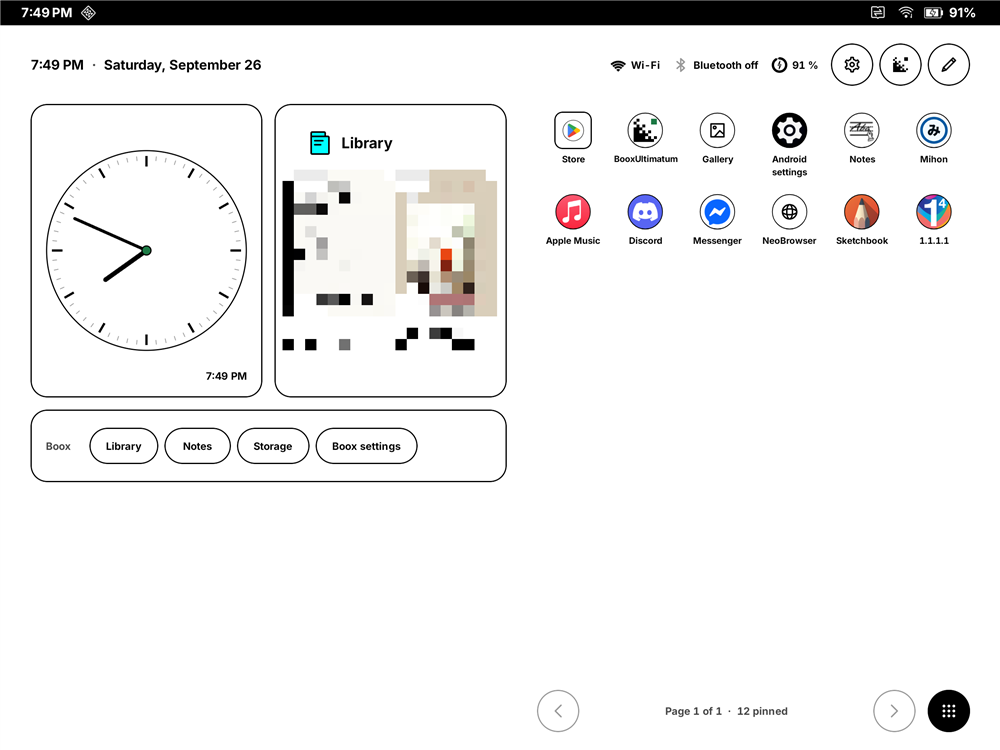
The BooxUltimatum home screen in landscape: the time and date across the top with Wi-Fi, Bluetooth and battery, a clock dial and a Library widget on the left above a Boox shelf with Library, Notes, Storage and Boox settings keys, and two rows of apps on the right.
Fig. 1The home screen in landscape, on the Note Air6 C. Library covers are pixelated.

How much access it needs

Every feature declares the least access it needs. More ink on the scale means more privilege; the app stays useful with none.

  1. T0 Just the app

    Home screen, sleep and power-off screens, Instant ink, battery measurement, the tablet font and the settings hub.

    Useful from the first open

  2. T1 adb grants

    Four permissions granted once from a computer. Adds battery statistics in the app, status bar icons shown or hidden tablet-wide, and setting-based tweaks.

  3. T2 Shizuku

    A small helper with the same rights as adb, started from a computer after each reboot. Adds most tweaks, one-tap background fixes and the network name.

  4. T3 Root

    Out of scope. The bootloader on this tablet is locked, and BooxUltimatum doesn't need or ask for root.

Why no root, and what each tier can reach

Why it exists

The Note Air6 C is a lovely tablet with a frustrating side. Independent reviews such as eWritable's praise the screen and the pen, then point at the same two things owners complain about: battery life, and software that scatters useful settings across a dozen places.

BooxUltimatum is one owner's attempt to fix that from the inside. It's a single APK. Nothing is flashed, and the bootloader stays locked.

Verified on
BOOX Note Air6 COne tablet, the author's own
Firmware
4.3, Android 164.3-rel_0817, built 2026-08-17
Other models
UntestedLikely close, not yet confirmed
Bootloader
Locked, and it stays locked
Status
Public preview0.5, the sleep screen while asleep
License
GPL-3.0-or-later
  • Written down

    Every device fact it relies on has its test recorded in the evidence log.

  • Explained

    Plain words for what a change does, and the access it needs to do it.

  • Undoable

    Every change records what it replaced, and Undo puts it back.

What it does

How each part works

A home screen made for e-ink

A calm, paper-white launcher that uses about a third of the Boox home's memory and no CPU when idle.

  • Widgets: clock, month, agenda, weather, battery, next alarm, a note, a Boox shelf, and any app's widget, including Boox's own.
  • Apps: paged grids turned with a swipe, folders, and icon shapes that remove the frame Boox draws into its own icons.
  • All apps includes the Boox functions that have no launcher icon.
  • Going back to the Boox home is one tap, and it's recorded before the first switch.
The resource budget, measured
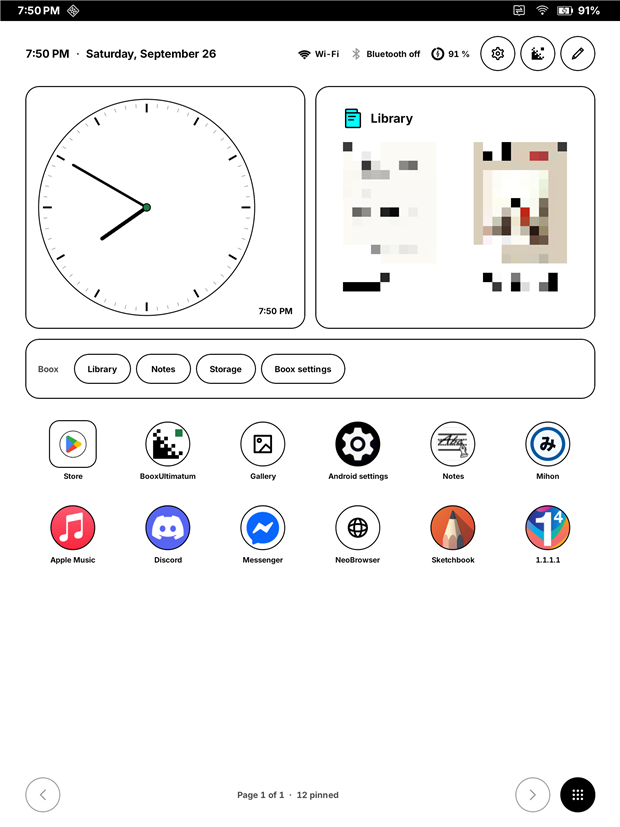
Home in portrait: clock, Library and Boox shelf widgets, then a grid of apps.
Fig. 2Home, portrait.
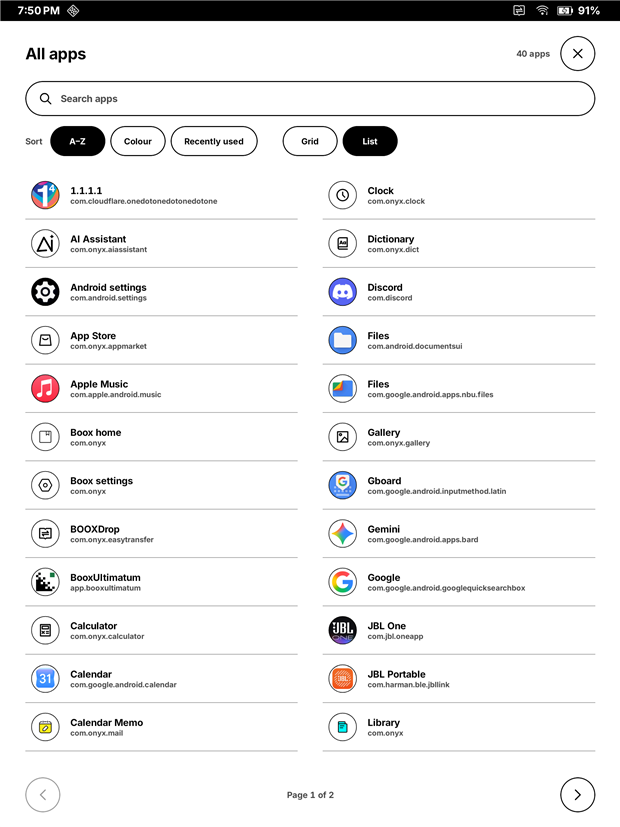
All apps as a two-column list sorted A to Z.
Fig. 3All apps, sorted A to Z.

Your own sleep screen

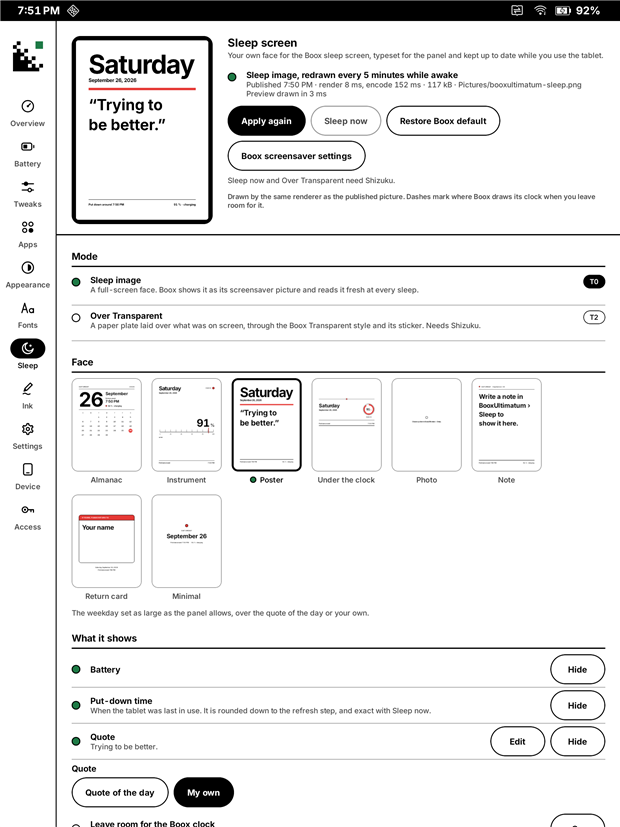
Boox gives you six preset screensavers. BooxUltimatum gives you twenty-one faces set in your tablet font, each with its own portrait and landscape layout, and twelve of them keep time while the tablet sleeps.

  • Live faces: Dial, Clock, Monitor, Cube (a 3D cube clock), Split-flap, Dashboard, Word clock, Day ring, Timeline, LCD, Sky and Broadsheet. Still faces: Almanac, Year, Instrument, Poster, Under the clock, Photo, Note, Return card and Minimal. Many have options of their own.
  • Fresh: Boox reads the picture only as the tablet goes to sleep, so the studio redraws it while you use the tablet. The time it shows is honest: “put down around 4:30 PM”.
  • Both orientations are kept ready, so turning the tablet never leaves a cropped face.
  • While asleep (new, opt-in): the face can update every 5 to 60 minutes while the tablet sleeps, and cover Boox's charging bar. It needs an accessibility service that only holds the picture, and its battery cost isn't measured yet.
How the picture reaches the sleep screen
The Sleep screen studio in portrait: a preview of the face, Apply keys, the mode and the face picker.
Fig. 4The sleep screen studio.
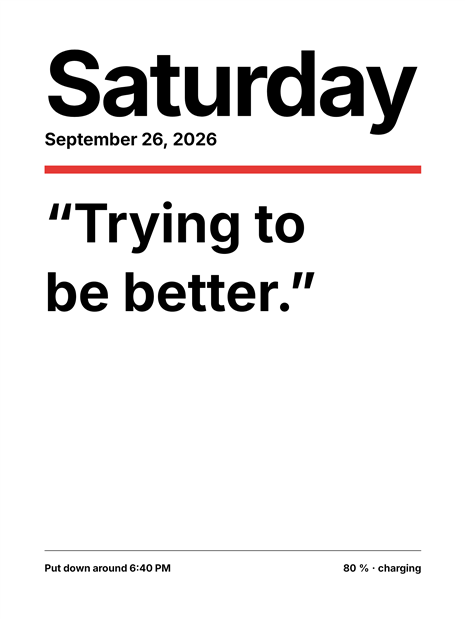
A Poster sleep face: the word Saturday set very large, the date, a red bar, a short quote, and a footer reading put down around 6:40 PM and 80 percent, charging.
Fig. 5The Poster face, as the panel shows it.

Instant ink for other apps Experimental

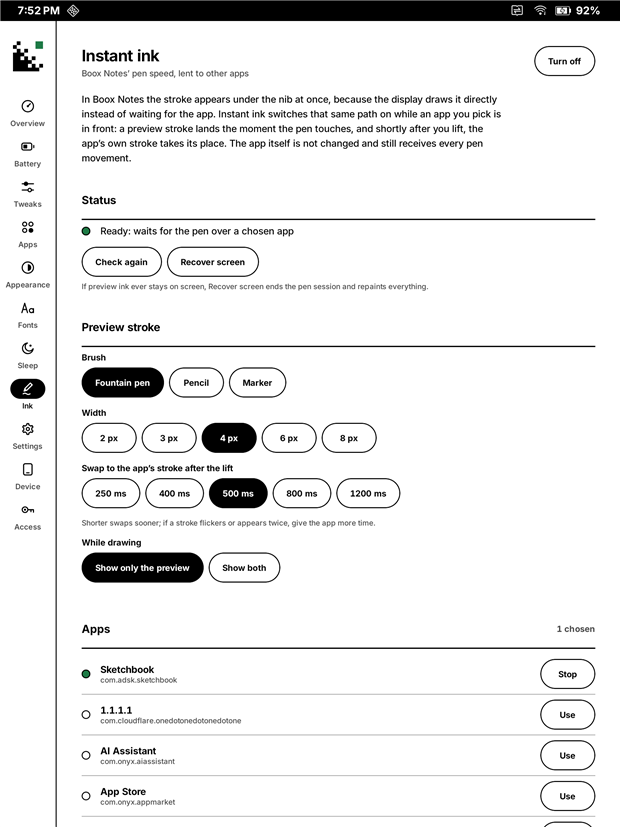
In Boox Notes, ink appears under the nib in about 10 ms. In Sketchbook and most other apps, it trails behind. The display system draws the stroke straight from the pen, a firmware feature Onyx offers app developers through its public pen SDK. Most apps don't include it, so BooxUltimatum switches that path on from the outside for apps you choose.

  • A preview stroke lands at once; half a second after you lift, the app's own brush takes its place. A session kept ready means even the first stroke after unlocking gets it.
  • The app isn't modified in any way. No root and no Shizuku, only usage access, allowed on the tablet, so it knows which app is in front. A Quick Settings switch turns it on and off.
  • Still being tuned: the preview is black only, and it's been tried in Sketchbook alone. On a Note Air 2 Plus and a Go 10.3 Gen II Lumi it had no effect; the Ink page now shows what it found, with a pen test.
What the display system is asked to do
The Instant ink page: status, brush, width, swap delay and the list of apps it applies to.
Fig. 6The Instant ink page: brush, width, swap delay and apps.

A battery doctor that doesn't drain the battery

Measure drain, see what keeps the tablet awake, and keep a log that never wakes it to write a line.

  • Measure: unplug, use the tablet, read the rate. Time left comes from real mAh, not guesses.
  • Log: every screen, plug and level change, with a chart and a one-zip export.
  • Found so far: standby is already excellent, 0–12 mA. Screen-on use is where the battery goes.
How the log stays out of the way
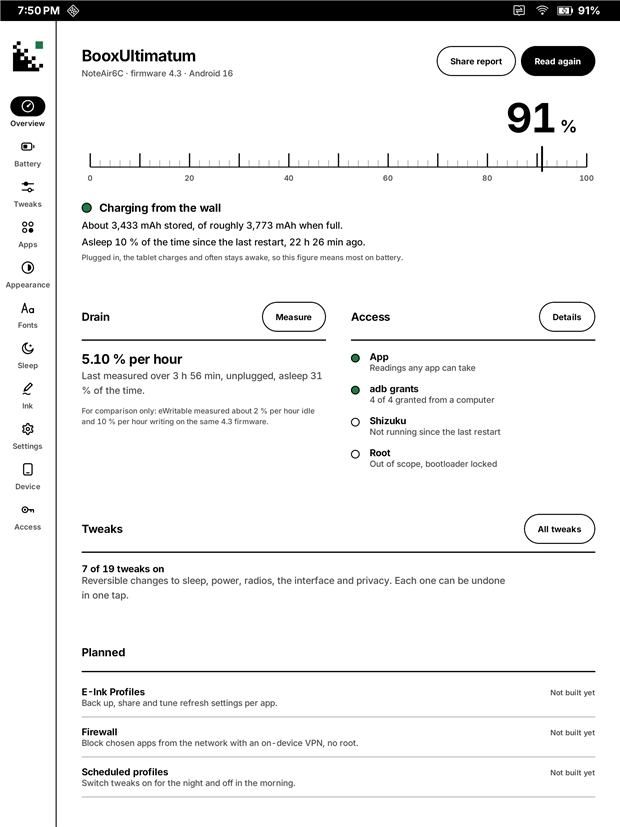
Overview: a tuning-scale battery gauge at 91 percent, charging status, measured drain, access level and tweak count.
Fig. 7Overview.
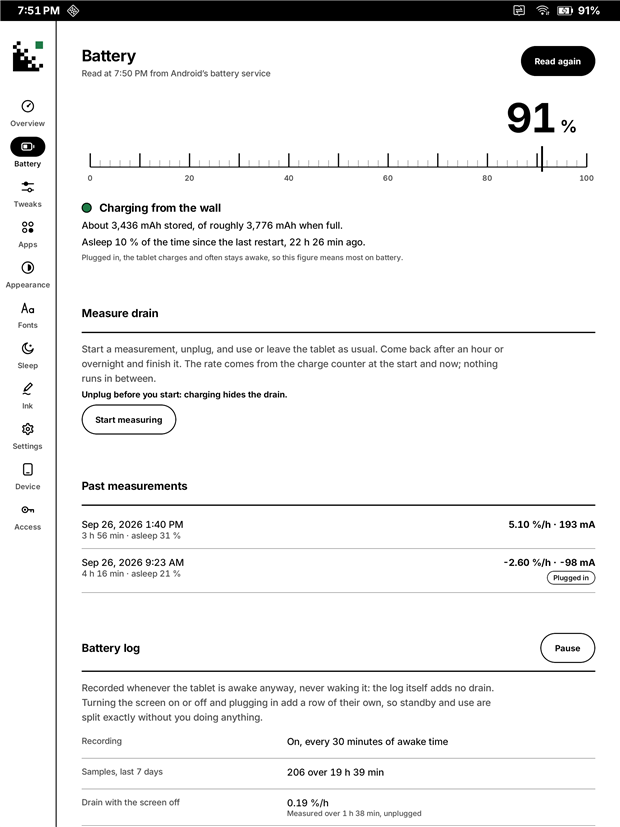
Battery: measure drain, past measurements and the battery log.
Fig. 8Battery.

Tweaks you can undo

Nineteen reversible tweaks across apps, sleep, power, radios, interface and privacy. Every one records what it replaced.

  • Let your apps keep running. Boox background-restricts every app you install, which is why music stops a minute after you leave the player.
  • Let Boox apps sleep, Turn on Doze and Pause idle Boox apps.
  • The whole tablet's font, at a proper weight, from a Google Fonts browser of 1946 families.
The journal, and what each tweak changes
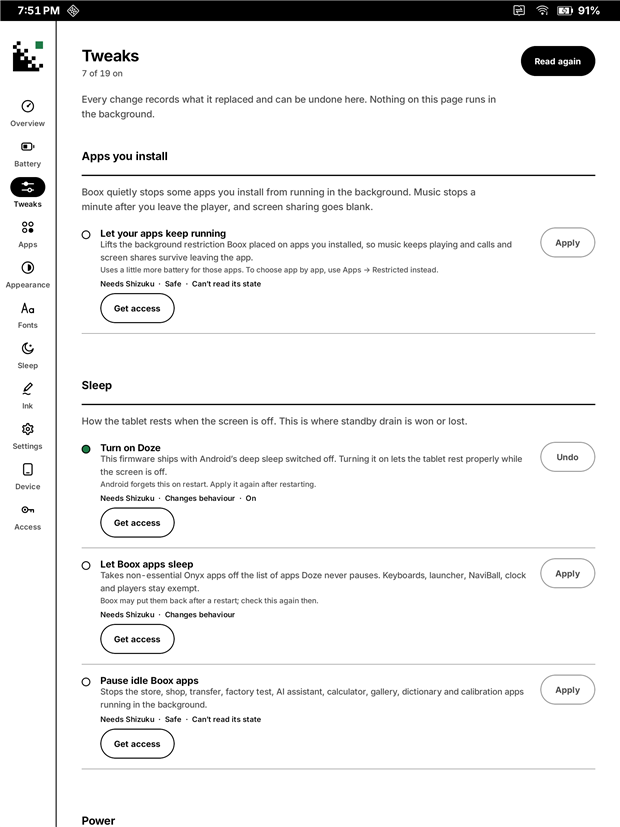
Tweaks: grouped, reversible changes, each showing its access level.
Fig. 9Tweaks, with their access level.
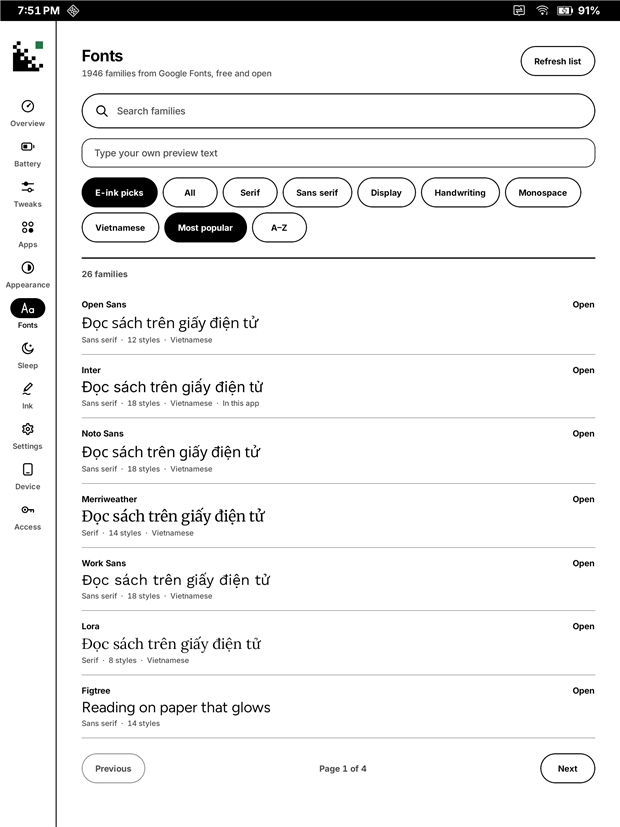
Fonts: a Google Fonts browser with Vietnamese previews.
Fig. 10The fonts browser.

Get it

Releases

From a release

Releases are on the Releases page as release-signed APKs. 0.5 brings the sleep screen while asleep and twenty-one faces; next come the battery cost of those updates measured overnight, refinements from how the faces look on the panel, and a first-run guide for the adb grants and Shizuku. There are no dates promised; each release ships when it works on the tablet.

Until then there is nothing to download, and the honest way to try it is to build it.

From source, today

# JDK 21 and the Android SDK (platform 36)
.\gradlew.bat assembleRelease
adb install -r app\build\outputs\apk\release\app-release.apk

Release builds from source are debug-signed for now, so they update an installed copy in place. The README has the full steps, and how to go back to the Boox home.

The project